Showing posts with label HTML5. Show all posts

Wednesday, November 9, 2011

An Open Standard - HTML5, Yes; Flash, No

Adobe says it will pull Flash, its software for Web video and software, from the Web browsers of mobile devices. Flash will still work on mobile apps and on computers' Web browsers.

It's a win for Apple Inc., which has famously banned Flash from working on the iPhone and the iPad.

The mobile era is about low power devices, touch interfaces and open web standards - all areas where Flash falls short.

HTML5’s video chief rival, Adobe Flash, appears to be throwing in the towel.

HTML5 is now universally supported on major mobile devices, in some cases exclusively.

This makes HTML5 the best solution for creating and deploying content in the browser across mobile platforms.

The writing may be on the wall. While Adobe programmers will be able to use their same Adobe software development tools, the end-product is clearly going to be HTML5 video. Flash may now be a legacy format.

Silverlight? Microsoft’s one time rival to Flash? It may be toast. The day of non-standard video formats seems to be coming to an end.

Note 1: Adobe is working on Flash Player 12 and a new round of features which they expect to again advance what is possible for delivering high definition entertainment experiences … to the desktop, not to mobile devices.

Note 2: Flash is not an open standard — it is controlled by Adobe Systems — whereas HTML5 is largely controlled by a committee made up of three companies, one of them being Apple.

Click here for an 11/11/11 Wall Street Journal front-page article on HTML5.


Developers now have to consider three development environments to address desktop and mobile device access: 1). traditional Websites using Flash for desktop and laptop access, 2) mobile-optimized Websites using HTML5 for mobile-device Web access, and 3) mobile-application development that may interact with Web resources on the back end.

Adobe is now focusing its mobile developer solutions on Adobe Integrated Runtime (AIR) that helps developers use Flash technology and develop apps that will run across multiple mobile platforms such as iOS, Android, BlackBerry and Windows Phone.

Monday, September 19, 2011

Webkit-Based Development Revisited


I've made references to Webkit-based technologies in prior posts to this blog and in some early articles. For example,


Click here (2011) and here (2008).

I've also been referring to HTML5 of late. For example,

Click here and here

And way back, I've referred to A/B testing. For example,

Click here (2009)

For a presentation from NetFlix that pulls together these and other related topics,

Click here. The download of this 7 MB pdf file may take awhile if you have a slow connection.

Comment: While you may not be working on a project exactly like the one the authors discuss, you may find its information interesting nonetheless. I did.


As the default browser for both iPhone and Android, WebKit has become a major player in the mobile arena, offering a wider array of HTML5 and CSS3 support than any other major engine. For a soon-to-be-available book, see


This book gets you started with WebKit and shows you how to maximize HTML5 and CSS3 features in WebKit, and it addresses ways to optimize your web site for mobile devices and enhance the mobile user experience.

Friday, August 5, 2011

The Changing Landscape For HTLM5 Design


Motion and Interaction Design for HTML5

Adobe Edge Preview is a new Web motion and interaction design tool that allows designers to bring animated content to websites, using web standards like HTML5, JavaScript, and CSS3.

The initial version of Edge focuses primarily on adding rich motion design to new or existing HTML projects, that runs beautifully on devices and desktops.

Click here to download your own copy of this free beta and examine the samples for yourself. With them, you can be up and running in only a few minutes, or click here to see an image of one of these samples that I've run on my desktop, or click here for one video that shows Edge in use and/or here for another.


{ Click on the image above for a larger view }

As much as we can give Apple credit for getting the HTML5 ball rolling, Adobe's decision to offer an HTML5 design tool is unlikely the result of Adobe giving in to Apple. It is a reasonable business decision that answers to a global trend - a decision that is driven rather by opportunity than surrender.

Few of us paid attention to this new format before Apple said it would deny Flash access to its iOS platform for performance, security and power consumption reasons (while others claim it is really the closed platform approach that killed Flash on iOS).


Within two years, HTML5 has evolved from an Apple thought process to a global movement with the conviction that HTML5 will be the future standard of how Web applications will be developed. It is a conviction that is shared by those who follow corporate interests as well as those who have the open Web in mind, such as Mozilla. Whether we like it or not, HTML5 will become a powerful application layer for the Internet within a few years - the first application layer that will enable Internet applications and services that will look and feel like desktop applications today.


Adobe sees Edge as a tool designers can use along with its Creative Suite applications such as Photoshop and Dreamweaver (discussed on a few of my earlier posts to this blog), although direct import support isn’t available yet. Adobe does, however, have plans to add import support as development continues.


Edge-created content is viewable on any HTML5-aware browser, such as Safari, Firefox and Chrome, and works on mobile devices such as the iPhone, iPad, HP’s WebOS, and Android-based smartphones.


The beta is still in its early stages, so it isn’t feature complete yet, and Adobe plans to use feedback from customers in the development process.


If you look at the market share for browsers, you will find that less than half the browsers in use are HTML5 compatible at this point. That percentage is certain to rise rapidly over the next couple of years, but a substantial share of the browser market will require an alternative to HTML5 for the foreseeable future. Companies will still need to be backwards compatible for older browsers at a minimum and will employ Flash for this.


In addition to raw browser support, HTML5 lacks a number of features that Flash offers. Most notably, Flash includes digital rights management (DRM) features, while in HTML5, users can quickly save videos to their own machines. That may not sound like such a bad thing for users, but for developers and content owners, it's a serious problem. A number of DRM schemes are currently under consideration for HTML5, but the issue is far from resolved. The best-fitting software depends on your use case. Many projects will benefit from technologies like Flash that are not browser controlled, for some time to come.

Adobe to Capitalize on The Rise of HTML5

While Flash has been the dominant technology used to create interactive, animated content, its market share has been decreasing as HTML5 gains ground. Apple refused to support Flash on the iPhone and the iPad citing performance issues (as noted above), which led many developers to move to adopt HTML5.

With PC sales dropping and tablet sales showing tremendous growth, many developers will eventually move on to HTML5 to create content as it is compatible with most platforms and doesn’t need any special plugins.


With Adobe Edge, Adobe plans to capitalize on this shift to HTML5. With Edge, Adobe can recapture some of its lost market share and improve sales of its Creative Suite software bundle, which currently has more than a 40% share of the global market.


Wednesday, June 8, 2011

HTML5 is now playing in the big leagues


The Financial Times (London) yesterday introduced a mobile Web application aimed at luring readers away from Apple’s iTunes App Store, throwing down the gauntlet over new business conditions that Apple is set to impose on publishers who sell digital subscriptions via iTunes.


A number of publishers have expressed their displeasure with Apple’s plan to retain 30 percent of the revenue from subscriptions sold on iTunes, and to keep customer data from such sales, beginning at the end of June. At the same time, mobile applications are a fast-growing source of new readers and revenue, so publishers have been reluctant to pull their applications from the iTunes store.

The Financial Times, the British daily, has tried to get around this problem by designing a new app that includes much of the functionality of an iPad or iPhone application, while residing on the open Web. It employs a new Web technology standard called HTML5, which allows programmers to create a single application that can run on a variety of devices, including Apple’s iPhone and iPad, Google’s Android system and the BlackBerry PlayBook, although the new app does not work on some versions of the devices.

The Financial Times said it would encourage users of its iPad and iPhone applications to migrate to the new app. It said it did not plan to comply with Apple’s proposed conditions, even if that meant Apple removed the existing applications from iTunes.


= = = = = = = = = = = = = = = = = = = = = =

Update on my earlier posts on SecurID tokens

RSA Security has offered to replace the SecurID tokens used by enterprises and government agencies to secure their networks after attackers attempted to hack a defense contractor’s network in May.

The SecurID two-factor authentication technology relies on a pseudo-random number that is generated every 30 to 60 seconds. Users have to enter their own username, self-selected password and the code displayed on the token. The authentication server knows what number was generated. Attackers also now know how to figure out what number is being generated, and it is easy to steal usernames and passwords using phishing or keyloggers.

There are an estimated 40 million SecurID tokens currently in use.

Click here for an
open letter to RSA SecurID customers.

Friday, April 29, 2011

Using jQuery. HTML5, PhoneGap And More In The New Multiscreen World


The soon-to-be-released Adobe Dreamweaver CS5.5 (part of Creative Suite 5.5) helps you create content with HTML5, CSS3 and the JQuery mobile framework (among other things) and target multiple platforms including Android operating systems, iOS, and Adobe AIR. As seen in the images below, Dreamweaver CS5.5 reflects the new and growing presence of not only the desktop computer, but the smart phone and tablet as well.


{ Click on any of the images for larger view }

With the Dreamweaver CS5.5 Media Queries dialog box, you can attach or create CSS files for different screen sizes and force devices to report their actual widths.


PhoneGap


With the Mobile Applications feature and the SDK for Android (shown above) or iOS, you can emulate and create a native mobile application from your Dreamweaver CS5.5 site files.


PhoneGap is an HTML5 app platform that allows you to author native applications with Web technologies and get access to APIs and app stores.


To streamline your projects, the PhoneGap framework is now integrated as an extension in Dreamweaver CS5.5. So, using PhoneGap, you can build native Android and iOS apps directly from Dreamweaver CS5.5 projects.

Adobe has proven that it can work intimately with a vendor, such as with Research in Motion, whose application development strategy for the PlayBook at launch is 100 percent dependent on Adobe’s AIR and Flash technologies (and will be so until other native QNX SDKs and “Players” are released). Today, the PlayBook demonstrates excellent performance with the Flash and AIR runtimes as both stand-alone tablet apps and embedded into a Mobile browser.

Click here for a look of the Blackberry PlayBook runing video using Flash and HTML5. Video on the PlayBook is superb, with crisp resolution. Video arguably looks better on the PlayBook than on its iPad 2 and Motorola Xoom rivals.


At the same time, on the iOS platform, users aren't feeling any lack of Flash. Virtually every Web site imaginable has moved to HTML5 H.264-based encoding of embedded video. YouTube itself has also fully optimized itself for Mobile Safari and iOS. So, as I've been pointing out, to compensate for this shift, Adobe has introduced HTML5 support into its tools.

More to follow. Stay tuned.

Saturday, April 16, 2011

Developing Rich Web Apps On A Network With Many Platforms (JQuery Mobile)

We live in a networked world filled with smartphones, tablets, Internet-enabled televisions and, yes, desktop computers. So, it's no surprise that application development tools like the soon-to-be-released Adobe Creative Suite CS5.5 Web Premium reflect this evolution of the network by targeting multiple platforms including, but not limited to, Google's Android operating systems, Apple's iOS, RIM's Blackberry in addition to Adobe AIR by facilitating the authoring of rich content with HTML5, CSS3 and JQuery mobile to name a few. I've written about HTML5 and CSS3 in earlier posts to this blog and will have something to say about JQuery in an upcoming one. For now, please note that the

jQuery mobile framework takes the "write less, do more" mantra to the next level: Instead of writing unique apps for each mobile device or OS, the jQuery mobile framework will allow you to design a single highly branded and customized web application that will work on all popular smartphone and tablet platforms. Click here for more.

Basic features of jQuery Mobile include:

General simplicity
The framework is simple to use. You can develop pages mainly using markup driven with minimal or no JavaScript.

Progressive enhancement and graceful degradation
While jQuery Mobile leverages the latest HTML5, CSS3, and JavaScript, not all mobile devices provide such support. jQuery Mobile philosophy is to support both high-end and less capable devices, such as those without JavaScript support, and still provide the best possible experience.

Accessibility
jQuery Mobile is designed with accessibility in mind. It has support for Accessible Rich Internet Applications (WAI-ARIA) to help make web pages accessible for visitors with disabilities using assistive technologies.

Small size
The overall size of the jQuery Mobile framework is relatively small at 12KB for the JavaScript library, 6KB for the CSS, plus some icons.

Theming
The framework also provides a theme system that allows you to provide your own application styling.

Some jQuery Mobile UI elements


But getting back to Adobe Creative Suite 5.5 Web Premium: with it, you can:

  • Manage content for different screen sizes.
  • Develop apps for virtually any mobile device.
  • Ensure design integrity across the entire web.

For a look at this new flexibility, click here to watch Adobe's Dreamweaver CS 5.5 creating a rich app for Apple's iPad.

Stay tuned!

Tuesday, December 28, 2010

HTML5, WebGL and Google Body Browser

Google has recently demoed an interesting WebGL application called Body Browser, which lets you explore the human body just like you can explore the world in Google Earth. Now you can try Google Body Browser before it's added to Google Labs, assuming that you have a WebGL-enabled browser:

* WebGL is available, but not enabled by default in Chrome 8 (the latest stable version).

* WebGL is enabled by default in Chrome 9 Beta, Chrome 9 Dev Channel, Chrome Canary Build and Firefox 4 beta.

Google Body is a detailed 3D model of the human body. You can peel back anatomical layers, zoom in, and click to identify anatomy, or search for muscles, organs, bones and more. You can also share the exact scene you are viewing by copying and pasting the URL.

The application doesn't require a plugin. Unlike many other web-based medical applications, no Flash, Java, or other plugins are needed. This application will run on any WebGL-supported browser.


WebGL is based on OpenGL ES 2.0 and provides a programmatic interface for 3D graphics. It uses the HTML5 canvas element and is accessed using Document Object Model interfaces. Automatic memory management is provided as part of the JavaScript language. HTML5 was discussed in some of my earlier posts.

Click here for Getting a WebGL Implementation

Click
here for An Introduction to HTML5

Comment: Years ago, matrices (and tensors) were taught only to graduate students. After some time, these subject(s) were taught to undergraduates too. Today, even a few elite secondary schools teach these subject(s). Similarly, anatomy references were once available only to medical students at institutions like the Harvard and Johns Hopkins Medical Schools. Today, anyone with a high-speed internet connection can access such an application.


For a 1-minute video on Google Body Browser, click here.

For a 7-minute video on Google Body Browser, click here.


Monday, October 11, 2010

HTML5 And Risks To Privacy On The Front Page Of The Non-Techinal Press

I have a couple of posts on HTML5 below. Nonetheless, I was a little surprised to see this topic (in the context of "risks to privacy") discussed on the front page of this morning's edition of the New York Times (and elsewhere):

From this morning’s front page:

Most Web users are familiar with so-called cookies, which make it possible, for example, to log on to Web sites without having to retype user names and passwords, or to keep track of items placed in virtual shopping carts before they are bought.

The new Web language (HTML5) and its additional features present more tracking opportunities because the technology uses a process in which large amounts of data can be collected and stored on the user’s hard drive while online. Because of that process, advertisers and others could, experts say, see weeks or even months of personal data. That could include a user’s location, time zone, photographs, text from blogs, shopping cart contents, e-mails and a history of the Web pages visited.


Click here for more.


Thursday, August 12, 2010

HTML5 - its support in Dreamweaver CS5, Internet Explorer 9 and elsewhere - Part II

There's been a lot of discussion lately about whether or not the HTML5 video tag is going to replace Flash Player for video distribution on the Web.

Consensus: While the video tag is a big step forward for open standards, the Adobe Flash Platform will continue to play a critical role in video distribution.

Click here for a discussion of this topic in the YouTube context (a pretty significant one).

HTML5 (and CSS3) are works in progress. While some parts of these specs are finished or stable, other parts are still under development or have no current browser support.

Nonetheless, leading development tools, e.g., Adobe's Dreamweaver, have begun to support these technologies. To wit, specs that are stable or that have some level of browser implementation are now seen in the new Dreamweaver CS5 HTML5 Pack. Select the Product Details tab.

While the official specifications are still not yet complete, they are now supported to varying degrees by a number of different desktop browsers – and more importantly by all smartphones using Webkit-based browsers (e.g. iPhone, Android, Nokia WRT, Blackberry OS). Given the recent surge of interest around HTML5, Dreamweaver CS5’s compatibility with HTML5 and CSS3 was updated so you can begin exploring their potential today.


Tuesday, May 25, 2010

HTML5 - its support in Dreamweaver CS5, Internet Explorer 9 and elsewhere

With HTML5, an open Web standard, the browser becomes a first class RIA citizen.

HTML5 is being developed as the next major revision of HTML (HyperText Markup Language), the core markup language of the World Wide Web. HTML5 is the proposed next standard for HTML 4.01, XHTML 1.0 and DOM Level 2 HTML. It aims to reduce the need for proprietary plug-in-based rich internet application (RIA) technologies such as Adobe Flash and Microsoft Silverlight.

The HTML5 video tag is a markup language tag, introduced in the HTML5 draft specification, that adds support for embedding video in an HTML page.

The Adobe Flash Player has been and continues to be widely used to embed video on web sites such as YouTube, since the majority of web browsers have Adobe's Flash Player installed (with controversial exceptions such as the browser on the Apple iPhone and iPad). Now, however, HTML5 video is intended by its creators to become the new standard way to show video online, but has been hampered by lack of agreement as to which video formats should be supported in the video tag.

Rather than relying on the browser plug-in Flash, Apple has adopted HTML5, CSS and JavaScript – all open standards. Apple’s mobile devices now ship with high performance, low power implementations of these open standards.

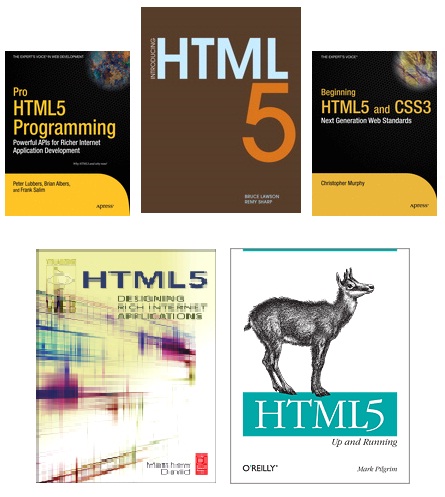
Not to be left out, Adobe has recently added HTML5 support to Dreamweaver CS5. This move should not be viewed only in light of the company's war of words with Apple regarding Flash, but in the other reality that HTML5 is reaching critical mass as evidenced by long-time holdout Microsoft adding HTML5 support to Internet Explorer 9 and a slew of HTML5 books being published by leading houses this summer. I've pictured the covers of a few of them at the end of this post.

These developments come despite the fact that HTML5 is still a work in progress. Even so, HTML5 in Dreamweaver CS5 makes for a mighty application development tool, as shown in the video http://www.youtube.com/watch?v=OEXrd8CR5AY

The HTML5 compatibility pack for Dreamweaver CS5 lets you author CSS3 and HTML5 compatible Web pages for modern browsers. And, of course, it supports the audio and video tags.

Note: The HTML5 extension will work only with Dreamweaver CS5 and not with any of the previous versions.

For more on this new Dreamweaver HTML5 support, check out labs.adobe.com and the following videos:

HTML5 Fundamentals with Dreamweaver CS5 - Semantic Structural Tags - Part 1

HTML5 Fundamentals with Dreamweaver CS5 - Semantic Structural Tags - Part 2


Readers of this blog who are interested in the Semantic Web may find the Part 2 video of particular interest.

HTML5 Fundamentals with Dreamweaver CS5 - Using the Video Tag


Finally, Microsoft will support HTML5 and CSS3 in Internet Explorer 9.0. A developer preview of their next browser can be downloaded from

http://ie.microsoft.com/testdrive/

and click here for a discussion of I.E. 9's
support for video content.

Note: There has been a lot of interest and debate about HTML5 and its support for video tags. This release of Internet Explorer provides such support, with tags available for H.264/MPEG4 and MP3/AAC codecs, leaving out support for the open source Ogg Vorbis and Ogg Theora video codecs.


A final note: HTML5 is not likely to displace Adobe Flash videos any time soon. As evidence of this, consider the latest news from Dell: Dell Inc. yesterday unveiled plans for a computer tablet based on Google Inc.’s Android operating system.

Called Streak, the tablet will have a 5-inch screen, Wi-Fi, Bluetooth, and work on a 3G network. Users can download music; interact with social-networking sites; send e-mail, text and instant messages; and make phone calls. It has turn-by-turn navigation with Google Maps, a 5-megapixel camera with flash, and a removable battery.

Streak will have 2 gigabytes of internal storage. Memory can be expanded up to 32 gigabytes allowing it to store as many as 42 movies or 16,000 songs.

Later in the year, the tablet will support Adobe Flash 10.1 — something Apple Inc.’s iPhone, iPad, and iPod Touch devices do not. Flash is widely used for online video.

The Streak is designed to be larger than a smartphone but more portable than a laptop. It is 6 inches wide, nearly 3 inches high, and half an inch thick.