Showing posts with label Adobe. Show all posts

Friday, August 5, 2011

The Changing Landscape For HTLM5 Design


Motion and Interaction Design for HTML5

Adobe Edge Preview is a new Web motion and interaction design tool that allows designers to bring animated content to websites, using web standards like HTML5, JavaScript, and CSS3.

The initial version of Edge focuses primarily on adding rich motion design to new or existing HTML projects, that runs beautifully on devices and desktops.

Click here to download your own copy of this free beta and examine the samples for yourself. With them, you can be up and running in only a few minutes, or click here to see an image of one of these samples that I've run on my desktop, or click here for one video that shows Edge in use and/or here for another.


{ Click on the image above for a larger view }

As much as we can give Apple credit for getting the HTML5 ball rolling, Adobe's decision to offer an HTML5 design tool is unlikely the result of Adobe giving in to Apple. It is a reasonable business decision that answers to a global trend - a decision that is driven rather by opportunity than surrender.

Few of us paid attention to this new format before Apple said it would deny Flash access to its iOS platform for performance, security and power consumption reasons (while others claim it is really the closed platform approach that killed Flash on iOS).


Within two years, HTML5 has evolved from an Apple thought process to a global movement with the conviction that HTML5 will be the future standard of how Web applications will be developed. It is a conviction that is shared by those who follow corporate interests as well as those who have the open Web in mind, such as Mozilla. Whether we like it or not, HTML5 will become a powerful application layer for the Internet within a few years - the first application layer that will enable Internet applications and services that will look and feel like desktop applications today.


Adobe sees Edge as a tool designers can use along with its Creative Suite applications such as Photoshop and Dreamweaver (discussed on a few of my earlier posts to this blog), although direct import support isn’t available yet. Adobe does, however, have plans to add import support as development continues.


Edge-created content is viewable on any HTML5-aware browser, such as Safari, Firefox and Chrome, and works on mobile devices such as the iPhone, iPad, HP’s WebOS, and Android-based smartphones.


The beta is still in its early stages, so it isn’t feature complete yet, and Adobe plans to use feedback from customers in the development process.


If you look at the market share for browsers, you will find that less than half the browsers in use are HTML5 compatible at this point. That percentage is certain to rise rapidly over the next couple of years, but a substantial share of the browser market will require an alternative to HTML5 for the foreseeable future. Companies will still need to be backwards compatible for older browsers at a minimum and will employ Flash for this.


In addition to raw browser support, HTML5 lacks a number of features that Flash offers. Most notably, Flash includes digital rights management (DRM) features, while in HTML5, users can quickly save videos to their own machines. That may not sound like such a bad thing for users, but for developers and content owners, it's a serious problem. A number of DRM schemes are currently under consideration for HTML5, but the issue is far from resolved. The best-fitting software depends on your use case. Many projects will benefit from technologies like Flash that are not browser controlled, for some time to come.

Adobe to Capitalize on The Rise of HTML5

While Flash has been the dominant technology used to create interactive, animated content, its market share has been decreasing as HTML5 gains ground. Apple refused to support Flash on the iPhone and the iPad citing performance issues (as noted above), which led many developers to move to adopt HTML5.

With PC sales dropping and tablet sales showing tremendous growth, many developers will eventually move on to HTML5 to create content as it is compatible with most platforms and doesn’t need any special plugins.


With Adobe Edge, Adobe plans to capitalize on this shift to HTML5. With Edge, Adobe can recapture some of its lost market share and improve sales of its Creative Suite software bundle, which currently has more than a 40% share of the global market.


Friday, April 29, 2011

Using jQuery. HTML5, PhoneGap And More In The New Multiscreen World


The soon-to-be-released Adobe Dreamweaver CS5.5 (part of Creative Suite 5.5) helps you create content with HTML5, CSS3 and the JQuery mobile framework (among other things) and target multiple platforms including Android operating systems, iOS, and Adobe AIR. As seen in the images below, Dreamweaver CS5.5 reflects the new and growing presence of not only the desktop computer, but the smart phone and tablet as well.


{ Click on any of the images for larger view }

With the Dreamweaver CS5.5 Media Queries dialog box, you can attach or create CSS files for different screen sizes and force devices to report their actual widths.


PhoneGap


With the Mobile Applications feature and the SDK for Android (shown above) or iOS, you can emulate and create a native mobile application from your Dreamweaver CS5.5 site files.


PhoneGap is an HTML5 app platform that allows you to author native applications with Web technologies and get access to APIs and app stores.


To streamline your projects, the PhoneGap framework is now integrated as an extension in Dreamweaver CS5.5. So, using PhoneGap, you can build native Android and iOS apps directly from Dreamweaver CS5.5 projects.

Adobe has proven that it can work intimately with a vendor, such as with Research in Motion, whose application development strategy for the PlayBook at launch is 100 percent dependent on Adobe’s AIR and Flash technologies (and will be so until other native QNX SDKs and “Players” are released). Today, the PlayBook demonstrates excellent performance with the Flash and AIR runtimes as both stand-alone tablet apps and embedded into a Mobile browser.

Click here for a look of the Blackberry PlayBook runing video using Flash and HTML5. Video on the PlayBook is superb, with crisp resolution. Video arguably looks better on the PlayBook than on its iPad 2 and Motorola Xoom rivals.


At the same time, on the iOS platform, users aren't feeling any lack of Flash. Virtually every Web site imaginable has moved to HTML5 H.264-based encoding of embedded video. YouTube itself has also fully optimized itself for Mobile Safari and iOS. So, as I've been pointing out, to compensate for this shift, Adobe has introduced HTML5 support into its tools.

More to follow. Stay tuned.

Saturday, April 16, 2011

Developing Rich Web Apps On A Network With Many Platforms (JQuery Mobile)

We live in a networked world filled with smartphones, tablets, Internet-enabled televisions and, yes, desktop computers. So, it's no surprise that application development tools like the soon-to-be-released Adobe Creative Suite CS5.5 Web Premium reflect this evolution of the network by targeting multiple platforms including, but not limited to, Google's Android operating systems, Apple's iOS, RIM's Blackberry in addition to Adobe AIR by facilitating the authoring of rich content with HTML5, CSS3 and JQuery mobile to name a few. I've written about HTML5 and CSS3 in earlier posts to this blog and will have something to say about JQuery in an upcoming one. For now, please note that the

jQuery mobile framework takes the "write less, do more" mantra to the next level: Instead of writing unique apps for each mobile device or OS, the jQuery mobile framework will allow you to design a single highly branded and customized web application that will work on all popular smartphone and tablet platforms. Click here for more.

Basic features of jQuery Mobile include:

General simplicity
The framework is simple to use. You can develop pages mainly using markup driven with minimal or no JavaScript.

Progressive enhancement and graceful degradation
While jQuery Mobile leverages the latest HTML5, CSS3, and JavaScript, not all mobile devices provide such support. jQuery Mobile philosophy is to support both high-end and less capable devices, such as those without JavaScript support, and still provide the best possible experience.

Accessibility
jQuery Mobile is designed with accessibility in mind. It has support for Accessible Rich Internet Applications (WAI-ARIA) to help make web pages accessible for visitors with disabilities using assistive technologies.

Small size
The overall size of the jQuery Mobile framework is relatively small at 12KB for the JavaScript library, 6KB for the CSS, plus some icons.

Theming
The framework also provides a theme system that allows you to provide your own application styling.

Some jQuery Mobile UI elements


But getting back to Adobe Creative Suite 5.5 Web Premium: with it, you can:

  • Manage content for different screen sizes.
  • Develop apps for virtually any mobile device.
  • Ensure design integrity across the entire web.

For a look at this new flexibility, click here to watch Adobe's Dreamweaver CS 5.5 creating a rich app for Apple's iPad.

Stay tuned!

Saturday, February 19, 2011

IBM's Watson and Nuance's Dragon Medical

Earlier this week, after the Watson computer defeated human champions in a three-day match on the popular TV show Jeopardy, its creators and a Massachusetts software company prepared to sell a medical version of the smart machine.

IBM has an agreement with Nuance Communications Inc. of Burlington to sell Watson-based products to health care providers. Nuance already offers voice-recognition software for a variety of applications. The companies are pitching forthcoming technology that will, among other things, allow medical providers to describe symptoms orally and get diagnostic information in return.

Watson technology will enable Nuance to add artificial intelligence to its offerings. And that's where this blog comes in. I've been talking about these two topics, albeit separately, for some time now.

Watson's ability to analyze the meaning and context of human language, and quickly process information to find precise answers can assist decision makers, such as physicians and nurses, unlock important knowledge and facts buried within huge volumes of information, and offer answers they may not have considered to help validate their own ideas or hypotheses.

For example, a doctor considering a patient’s diagnosis could use Watson’s analytics technology, in conjunction with Nuance’s voice and clinical language understanding solutions, to rapidly consider all the related texts, reference materials, prior cases, and latest knowledge in journals and medical literature to gain evidence from many more potential sources than previously possible, thereby helping the medical professional to confidently determine the most likely diagnosis and treatment options.

For more information about the Watson computing system and the Jeopardy! challenge, click here.

On earlier posts to this blog, I discussed the semantic Web, ontologies, and speech recognition software from Nuance (and Adobe):

See, for example, my November 7, 2009 post "Vagueness, Logic and Ontology: Fuzzy Ontologies"

In traditional ontology theory, concepts and roles are crisp sets. However, there is a great deal of fuzziness in the real world.

For example, one may be interested in finding “a very strong flavored red wine” or in reasoning with concepts such as “a cold place”, “an expensive item”, “a fast motorcycle”, etc.

A possible solution to handling uncertain data is to incorporate fuzzy logic into ontologies. Unfortunately, these fuzzy ontologies have shortcomings – reasoners for fuzzy ontologies are not yet so polished as those for crisp (aka traditional) ontologies.

See, for example, my May 30, 2009 post on "Speech Recognition Software"

The trivial example of one-to-one translation given there can be extended to one-to-many translation: That is, in a matter of seconds, you could “program” Dragon Medical to type out a whole sentence in response to your speaking just a single word or code into the microphone. And, vice versa: you could “program” Dragon Medical to type out just a single word or code in response to your speaking a whole sentence into the microphone.

Thursday, August 12, 2010

HTML5 - its support in Dreamweaver CS5, Internet Explorer 9 and elsewhere - Part II

There's been a lot of discussion lately about whether or not the HTML5 video tag is going to replace Flash Player for video distribution on the Web.

Consensus: While the video tag is a big step forward for open standards, the Adobe Flash Platform will continue to play a critical role in video distribution.

Click here for a discussion of this topic in the YouTube context (a pretty significant one).

HTML5 (and CSS3) are works in progress. While some parts of these specs are finished or stable, other parts are still under development or have no current browser support.

Nonetheless, leading development tools, e.g., Adobe's Dreamweaver, have begun to support these technologies. To wit, specs that are stable or that have some level of browser implementation are now seen in the new Dreamweaver CS5 HTML5 Pack. Select the Product Details tab.

While the official specifications are still not yet complete, they are now supported to varying degrees by a number of different desktop browsers – and more importantly by all smartphones using Webkit-based browsers (e.g. iPhone, Android, Nokia WRT, Blackberry OS). Given the recent surge of interest around HTML5, Dreamweaver CS5’s compatibility with HTML5 and CSS3 was updated so you can begin exploring their potential today.


Saturday, May 15, 2010

Adobe's Extensible Metadata Platform (XMP) as used with DICOM images - Photoshop, MathWorks and Oracle Multimedia

Healthcare-related images (e.g., those that conform to the DICOM standard) can be moved from place-to-place within a local organization over a network and, with help from HL7, moved from place-to-place globally (and interoperably).

DICOM and HL7 are about program to program communication between computers, not a standard file format, and not information retrieval for use by humans.

The DICOM Upper Layer protocol (DUL) is the language used to make connections, compose, send, receive and decode messages.

• DICOM Services are the operations DICOM programs can do, e.g., send, store, look up information.

• DICOM Objects are the data that programs can send and receive, e.g., patient data, CT, MR and other images, radiation beams, anatomic structure contours.

This post will be concerned with the last of these: i.e., DICOM Objects.

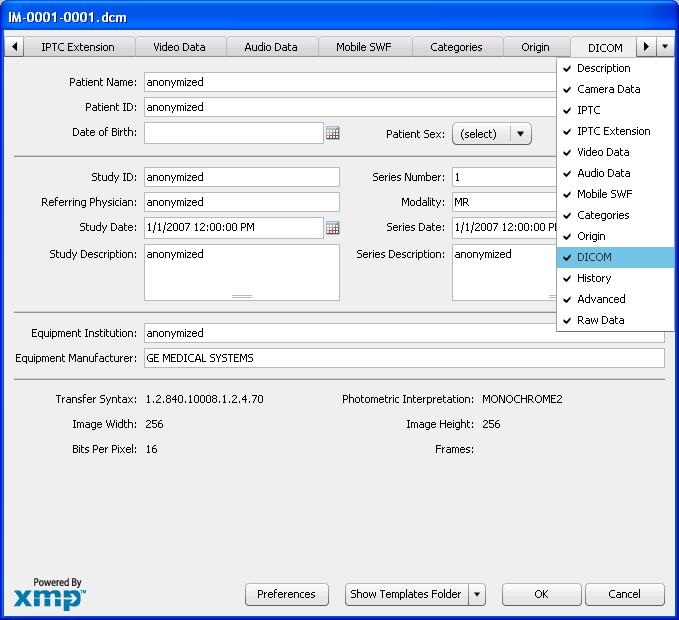
These images can be imported into Adobe Photoshop for a great deal of manipulation and, from there, accessed by Mathlab, which has powerful image analysis capabilities, and finally stored and managed (with search and much else) in Oracle Multimedia. Throughout, Adobe's Extensible Metadata Platform (XMP) - a labeling technology that allows you to embed data about a file, known as metadata, into the file itself - plays an important role.

Click here for more information on XMP.

Click here for an example of medical image processing with Photoshop

Click here for an introduction to medical image processing with MathWorks

Click here for an overview of Oracle Multimedia

and here for the first of several in-depth pages on Mutimedia DICOM

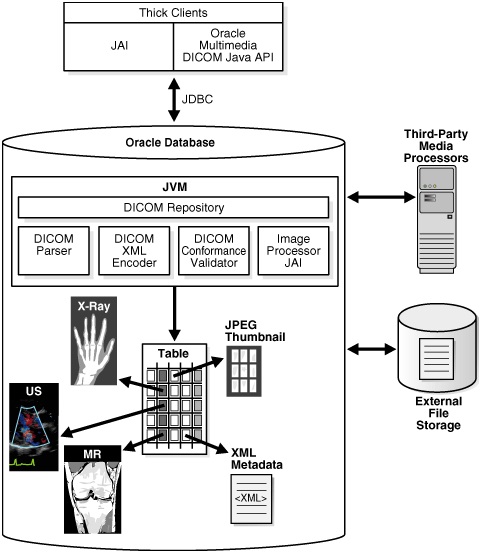
The figure below illustrates the architecture of typical DICOM Web application. Shown only as "Third-Party Media Processors" are Adobe Photoshop and MathLab Medical Imaging.


Click here for an example of a Photoshop and Mathlab collaboration before the advent of XMP

and here for how Mathlab can read XMP metadata today.

Click here for info on work with metadata (Dicom, XMP, etc.) in Photoshop


Finally, click here for another introduction to using Photoshop for processing DICOM files.