skip to main |
skip to sidebar
We live in a networked world filled with smartphones, tablets, Internet-enabled televisions and, yes, desktop computers. So, it's no surprise that application development tools like the soon-to-be-released Adobe Creative Suite CS5.5 Web Premium reflect this evolution of the network by targeting multiple platforms including, but not limited to, Google's Android operating systems, Apple's iOS, RIM's Blackberry in addition to Adobe AIR by facilitating the authoring of rich content with HTML5, CSS3 and JQuery mobile to name a few. I've written about HTML5 and CSS3 in earlier posts to this blog and will have something to say about JQuery in an upcoming one. For now, please note that the
jQuery mobile framework takes the "write less, do more" mantra to the next level: Instead of writing unique apps for each mobile device or OS, the jQuery mobile framework will allow you to design a single highly branded and customized web application that will work on all popular smartphone and tablet platforms. Click here for more.
Basic features of jQuery Mobile include:
General simplicity
The framework is simple to use. You can develop pages mainly using markup driven with minimal or no JavaScript.
Progressive enhancement and graceful degradation
While jQuery Mobile leverages the latest HTML5, CSS3, and JavaScript, not all mobile devices provide such support. jQuery Mobile philosophy is to support both high-end and less capable devices, such as those without JavaScript support, and still provide the best possible experience.
Accessibility
jQuery Mobile is designed with accessibility in mind. It has support for Accessible Rich Internet Applications (WAI-ARIA) to help make web pages accessible for visitors with disabilities using assistive technologies.
Small size
The overall size of the jQuery Mobile framework is relatively small at 12KB for the JavaScript library, 6KB for the CSS, plus some icons.
Theming
The framework also provides a theme system that allows you to provide your own application styling.
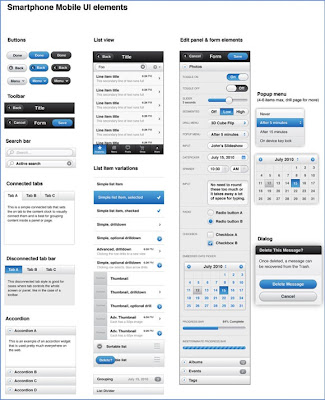
Some jQuery Mobile UI elements
But getting back to Adobe Creative Suite 5.5 Web Premium: with it, you can:
- Manage content for different screen sizes.
- Develop apps for virtually any mobile device.
- Ensure design integrity across the entire web.
For a look at this new flexibility, click here to watch Adobe's Dreamweaver CS 5.5 creating a rich app for Apple's iPad.
Stay tuned!
There's been a lot of discussion lately about whether or not the HTML5 video tag is going to replace Flash Player for video distribution on the Web.Consensus: While the video tag is a big step forward for open standards, the Adobe Flash Platform will continue to play a critical role in video distribution.Click here for a discussion of this topic in the YouTube context (a pretty significant one).HTML5 (and CSS3) are works in progress. While some parts of these specs are finished or stable, other parts are still under development or have no current browser support.Nonetheless, leading development tools, e.g., Adobe's Dreamweaver, have begun to support these technologies. To wit, specs that are stable or that have some level of browser implementation are now seen in the new Dreamweaver CS5 HTML5 Pack. Select the Product Details tab.
While the official specifications are still not yet complete, they are now supported to varying degrees by a number of different desktop browsers – and more importantly by all smartphones using Webkit-based browsers (e.g. iPhone, Android, Nokia WRT, Blackberry OS). Given the recent surge of interest around HTML5, Dreamweaver CS5’s compatibility with HTML5 and CSS3 was updated so you can begin exploring their potential today.
With HTML5, an open Web standard, the browser becomes a first class RIA citizen.
HTML5 is being developed as the next major revision of HTML (HyperText Markup Language), the core markup language of the World Wide Web. HTML5 is the proposed next standard for HTML 4.01, XHTML 1.0 and DOM Level 2 HTML. It aims to reduce the need for proprietary plug-in-based rich internet application (RIA) technologies such as Adobe Flash and Microsoft Silverlight.
The HTML5 video tag is a markup language tag, introduced in the HTML5 draft specification, that adds support for embedding video in an HTML page.
The Adobe Flash Player has been and continues to be widely used to embed video on web sites such as YouTube, since the majority of web browsers have Adobe's Flash Player installed (with controversial exceptions such as the browser on the Apple iPhone and iPad). Now, however, HTML5 video is intended by its creators to become the new standard way to show video online, but has been hampered by lack of agreement as to which video formats should be supported in the video tag.
Rather than relying on the browser plug-in Flash, Apple has adopted HTML5, CSS and JavaScript – all open standards. Apple’s mobile devices now ship with high performance, low power implementations of these open standards.
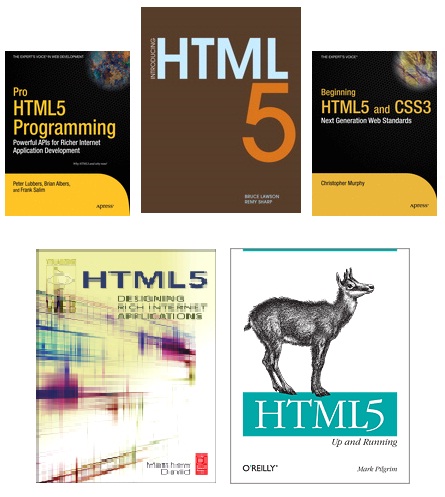
Not to be left out, Adobe has recently added HTML5 support to Dreamweaver CS5. This move should not be viewed only in light of the company's war of words with Apple regarding Flash, but in the other reality that HTML5 is reaching critical mass as evidenced by long-time holdout Microsoft adding HTML5 support to Internet Explorer 9 and a slew of HTML5 books being published by leading houses this summer. I've pictured the covers of a few of them at the end of this post.
These developments come despite the fact that HTML5 is still a work in progress. Even so, HTML5 in Dreamweaver CS5 makes for a mighty application development tool, as shown in the video http://www.youtube.com/watch?v=OEXrd8CR5AY
The HTML5 compatibility pack for Dreamweaver CS5 lets you author CSS3 and HTML5 compatible Web pages for modern browsers. And, of course, it supports the audio and video tags.
Note: The HTML5 extension will work only with Dreamweaver CS5 and not with any of the previous versions.
For more on this new Dreamweaver HTML5 support, check out labs.adobe.com and the following videos:
HTML5 Fundamentals with Dreamweaver CS5 - Semantic Structural Tags - Part 1
HTML5 Fundamentals with Dreamweaver CS5 - Semantic Structural Tags - Part 2
Readers of this blog who are interested in the Semantic Web may find the Part 2 video of particular interest.
HTML5 Fundamentals with Dreamweaver CS5 - Using the Video Tag
Finally, Microsoft will support HTML5 and CSS3 in Internet Explorer 9.0. A developer preview of their next browser can be downloaded from
http://ie.microsoft.com/testdrive/
and click here for a discussion of I.E. 9's support for video content.
Note: There has been a lot of interest and debate about HTML5 and its support for video tags. This release of Internet Explorer provides such support, with tags available for H.264/MPEG4 and MP3/AAC codecs, leaving out support for the open source Ogg Vorbis and Ogg Theora video codecs.
Called Streak, the tablet will have a 5-inch screen, Wi-Fi, Bluetooth, and work on a 3G network. Users can download music; interact with social-networking sites; send e-mail, text and instant messages; and make phone calls. It has turn-by-turn navigation with Google Maps, a 5-megapixel camera with flash, and a removable battery.
Streak will have 2 gigabytes of internal storage. Memory can be expanded up to 32 gigabytes allowing it to store as many as 42 movies or 16,000 songs.
Later in the year, the tablet will support Adobe Flash 10.1 — something Apple Inc.’s iPhone, iPad, and iPod Touch devices do not. Flash is widely used for online video.
The Streak is designed to be larger than a smartphone but more portable than a laptop. It is 6 inches wide, nearly 3 inches high, and half an inch thick.