Showing posts with label android. Show all posts
Showing posts with label android. Show all posts
Tuesday, December 6, 2011
The Personal Computer Is Dead ?
Saying that the personal computer is dead may or may not be premature. However, I just read an article that makes this assertion, and I'd like to suggest that you read it too.
Click here to read The personal computer is dead by Jonathan Zitttrain. He says in conclusion,
"A flowering of innovation and communication was ignited by the rise of the PC and the Web and their generative characteristics. Software was installed one machine at a time, a relationship among myriad software makers and users. Sites could appear anywhere on the Web, a relationship among myriad webmasters and surfers. Now activity is clumping around a handful of portals: two or three OS makers that are in a position to manage all apps (and content within them) in an ongoing way, and a diminishing set of cloud hosting providers like Amazon that can provide the denial-of-service resistant places to put up a website or blog."

Friday, April 29, 2011
Using jQuery. HTML5, PhoneGap And More In The New Multiscreen World
The soon-to-be-released Adobe Dreamweaver CS5.5 (part of Creative Suite 5.5) helps you create content with HTML5, CSS3 and the JQuery mobile framework (among other things) and target multiple platforms including Android operating systems, iOS, and Adobe AIR. As seen in the images below, Dreamweaver CS5.5 reflects the new and growing presence of not only the desktop computer, but the smart phone and tablet as well.

{ Click on any of the images for larger view }
With the Dreamweaver CS5.5 Media Queries dialog box, you can attach or create CSS files for different screen sizes and force devices to report their actual widths.

PhoneGap

With the Mobile Applications feature and the SDK for Android (shown above) or iOS, you can emulate and create a native mobile application from your Dreamweaver CS5.5 site files.

PhoneGap is an HTML5 app platform that allows you to author native applications with Web technologies and get access to APIs and app stores.

To streamline your projects, the PhoneGap framework is now integrated as an extension in Dreamweaver CS5.5. So, using PhoneGap, you can build native Android and iOS apps directly from Dreamweaver CS5.5 projects.
Adobe has proven that it can work intimately with a vendor, such as with Research in Motion, whose application development strategy for the PlayBook at launch is 100 percent dependent on Adobe’s AIR and Flash technologies (and will be so until other native QNX SDKs and “Players” are released). Today, the PlayBook demonstrates excellent performance with the Flash and AIR runtimes as both stand-alone tablet apps and embedded into a Mobile browser.
Click here for a look of the Blackberry PlayBook runing video using Flash and HTML5. Video on the PlayBook is superb, with crisp resolution. Video arguably looks better on the PlayBook than on its iPad 2 and Motorola Xoom rivals.
At the same time, on the iOS platform, users aren't feeling any lack of Flash. Virtually every Web site imaginable has moved to HTML5 H.264-based encoding of embedded video. YouTube itself has also fully optimized itself for Mobile Safari and iOS. So, as I've been pointing out, to compensate for this shift, Adobe has introduced HTML5 support into its tools.
More to follow. Stay tuned.
Saturday, April 16, 2011
Developing Rich Web Apps On A Network With Many Platforms (JQuery Mobile)
We live in a networked world filled with smartphones, tablets, Internet-enabled televisions and, yes, desktop computers. So, it's no surprise that application development tools like the soon-to-be-released Adobe Creative Suite CS5.5 Web Premium reflect this evolution of the network by targeting multiple platforms including, but not limited to, Google's Android operating systems, Apple's iOS, RIM's Blackberry in addition to Adobe AIR by facilitating the authoring of rich content with HTML5, CSS3 and JQuery mobile to name a few. I've written about HTML5 and CSS3 in earlier posts to this blog and will have something to say about JQuery in an upcoming one. For now, please note that the
jQuery mobile framework takes the "write less, do more" mantra to the next level: Instead of writing unique apps for each mobile device or OS, the jQuery mobile framework will allow you to design a single highly branded and customized web application that will work on all popular smartphone and tablet platforms. Click here for more.
Basic features of jQuery Mobile include:
General simplicity
The framework is simple to use. You can develop pages mainly using markup driven with minimal or no JavaScript.
Progressive enhancement and graceful degradation
While jQuery Mobile leverages the latest HTML5, CSS3, and JavaScript, not all mobile devices provide such support. jQuery Mobile philosophy is to support both high-end and less capable devices, such as those without JavaScript support, and still provide the best possible experience.
Accessibility
jQuery Mobile is designed with accessibility in mind. It has support for Accessible Rich Internet Applications (WAI-ARIA) to help make web pages accessible for visitors with disabilities using assistive technologies.
Small size
The overall size of the jQuery Mobile framework is relatively small at 12KB for the JavaScript library, 6KB for the CSS, plus some icons.
Theming
The framework also provides a theme system that allows you to provide your own application styling.
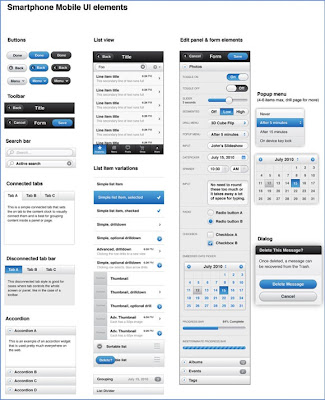
Some jQuery Mobile UI elements
But getting back to Adobe Creative Suite 5.5 Web Premium: with it, you can:
For a look at this new flexibility, click here to watch Adobe's Dreamweaver CS 5.5 creating a rich app for Apple's iPad.
Stay tuned!
jQuery mobile framework takes the "write less, do more" mantra to the next level: Instead of writing unique apps for each mobile device or OS, the jQuery mobile framework will allow you to design a single highly branded and customized web application that will work on all popular smartphone and tablet platforms. Click here for more.
Basic features of jQuery Mobile include:
General simplicity
The framework is simple to use. You can develop pages mainly using markup driven with minimal or no JavaScript.
Progressive enhancement and graceful degradation
While jQuery Mobile leverages the latest HTML5, CSS3, and JavaScript, not all mobile devices provide such support. jQuery Mobile philosophy is to support both high-end and less capable devices, such as those without JavaScript support, and still provide the best possible experience.
Accessibility
jQuery Mobile is designed with accessibility in mind. It has support for Accessible Rich Internet Applications (WAI-ARIA) to help make web pages accessible for visitors with disabilities using assistive technologies.
Small size
The overall size of the jQuery Mobile framework is relatively small at 12KB for the JavaScript library, 6KB for the CSS, plus some icons.
Theming
The framework also provides a theme system that allows you to provide your own application styling.
Some jQuery Mobile UI elements

But getting back to Adobe Creative Suite 5.5 Web Premium: with it, you can:
- Manage content for different screen sizes.
- Develop apps for virtually any mobile device.
- Ensure design integrity across the entire web.
For a look at this new flexibility, click here to watch Adobe's Dreamweaver CS 5.5 creating a rich app for Apple's iPad.
Stay tuned!
Subscribe to:
Comments (Atom)